Vadrel Journal
How an MCP Proxy Can Reduce AI Token Spend
Connecting more MCP servers can quietly increase the cost of every AI request. An MCP proxy can reduce that overhead by exposing only the tools a model actually needs.
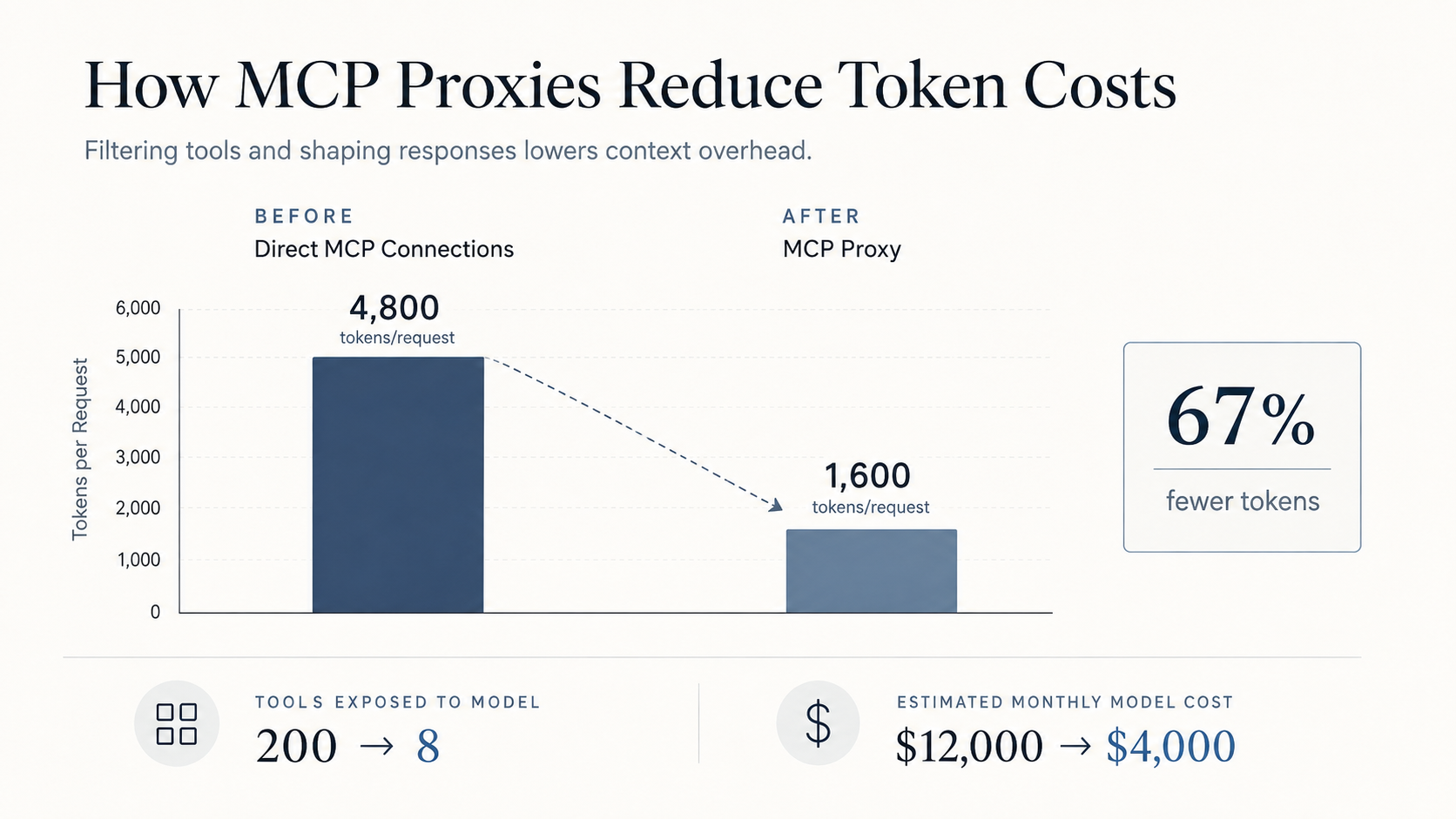
How MCP Proxies Reduce AI Token Costs
Agents are everywhere now.
You have the hobbyist making an agent for his mom so she never forgets a friend’s birthday. Then you have companies running 100 plus agents across the org that are always on, mostly hands off, and doing real work every day.
Eventually someone looks at the token bill.
A client we are currently working with is sitting at around a $676,000 annualized run rate in AI spend. That is a run rate, not a locked contract. For a mid size firm, that is not exactly a drop in the bucket.
We already moved the average user away from frontier models and that helped some. The problem is that spend is still growing at roughly 5.5% month over month. If that holds, you are looking at something close to a double in a year.
They have a non trivial number of agents running across the organization, alongside some very eager teams that have adopted AI into just about everything they do. Those two things are the main drivers behind the leftover growth. User chat got cheaper. Always on agents and high frequency workflows did not.
Now, to be clear, this is a good problem to have.
People are using the tools.
The agents are useful.
The business is getting value.
But that does not mean you just accept the bill.
So we took on the FinOps role and started looking at ways to blunt the spend without telling everyone to stop using AI.
We had worked on this problem before, and there is one path that we still see a lot of organizations overlooking.
MCP proxies.
A quick rundown on MCP
A quick rundown if you do not yet know what MCP is.
MCP stands for Model Context Protocol. It gives AI systems a standard way to connect to the tools and data your business already uses.
Think of MCP like a universal adapter for AI.
Instead of building a custom integration every time you want an AI assistant to access your CRM, database, document system, internal application, or some other business tool, MCP gives those systems a common way to expose what the AI is allowed to use.
In practical terms, that is one of the things that lets AI move from answering questions to working with your business systems. It can look up information, retrieve documents, query internal data, check systems, and take approved actions.
This is where things start to get interesting from a cost perspective.
Before the model can decide which tool it should use, it generally needs to know what tools are available. That means tool names, descriptions, parameters, schemas, and instructions all have to make their way into context.
If you have five tools, who cares.
If you have 200 tools spread across a bunch of MCP servers, now we have something worth paying attention to. That number is not hypothetical. One official GitHub MCP is already around 90 tools by itself. Five business systems is how you get to 200 without anyone doing something exotic.
You are spending tokens telling the model about tools that it may never use.
Those definitions get stuffed into context. Sometimes you pay for them on every turn. Sometimes prompt caching hides the repeat charge. You still pay the first turn of a conversation, the cache miss, and every time the catalog changes. And you always pay in attention. The model is reading a menu it does not need.
When that happens at scale, it stops being a technical detail. It becomes a cost problem.
The question we started asking
Which brings us to the question we started asking:
Why are we paying to tell the model about tools it does not need?
The question then becomes an architecture question.
How do we reduce the number of tools being exposed to the model so we can reduce the cost?
That is when we started looking harder at the MCP layer itself.
Some of this can be attacked on the client side. Tool search, deferred loading, allow lists in the agent runtime. Those are real options, and if you only have one client talking to a handful of servers, start there. A proxy starts to matter when you have many clients, many MCP servers, and you want one place to apply policy, cut the catalog, and keep an audit trail.
What we got wrong
We experimented with a few approaches and, at first, actually saw token costs go UP.
That obviously meant we needed to go back to the drawing board.
The problem was pretty simple once we looked at it.
We had essentially created a dumb pass through proxy.
It added metadata.
It added verbose wrappers.
It added another layer without actually making the model context any smarter.
We were looking at the problem through the wrong lens.
The proxy could not just be another network hop.
It needed to be a context management layer.
That was the shift.
We began using centralized tool filtering, schema compression, and response shaping.
Instead of presenting every possible tool to the model, we started giving it the tools that were actually relevant to the task in front of it.
Instead of letting every MCP define massive and inconsistent schemas however it wanted, we began compressing and normalizing them.
Instead of blindly passing massive responses back into context, we started shaping what actually needed to make it back to the model.
Two things here, because we got the first version wrong and it is easy to get the second version wrong too.
The goal is fewer irrelevant tokens, not fewer tokens at any cost. If you hide the right tool, the model retries, calls the wrong thing, or burns another full turn discovering what you should have shown it. Extra turns are output tokens plus another prompt. Compression that strips the descriptions the model uses to tell similar tools apart will create the same mess.
Filtering only helps if the definition actually leaves context. A deny list that still ships the schema is how you pay for a tool the model is not allowed to use, then watch it try to call it anyway.
What changed when we got it right
When we got that right, two things happened.
The first was the obvious one.
It reduced model spend.
The second one was probably even more interesting.
We started seeing better model performance because there were suddenly fewer irrelevant tools competing for the model’s attention.
The model had less noise.
It had fewer choices to sort through.
And it got better at picking the right tool.
That was a huge win.
Response shaping did double duty. It cut junk tokens coming back from list endpoints and fat JSON payloads. In a regulated shop it is also a control. Strip fields the model does not need. Cap arrays. Drop the avatar URLs and the nulls. Keep raw customer records from landing in context just because an upstream MCP returned the whole object.
The tradeoffs
Now, we could end the post here and tell you MCP proxies fix everything.
They don’t.
Cost went down for us.
Model performance got better.
Those are two pretty big wins.
But you are still adding another piece of infrastructure into the middle of some potentially very sensitive systems.
We would rather put the failure modes on the page than hide them.
So let’s go through some of the pluses and minuses.
First, the negatives
1. You are expanding the trust boundary.
We commonly work in highly regulated industries, so this one matters a lot.
The proxy becomes yet another privileged system that has to be secured, audited, monitored, and governed.
It may be sitting in the middle of tool calls that involve customer information, internal data, credentials, authorization context, and potentially sensitive business actions.
That is not something you throw into the architecture and forget about.
In the financial markets we work with, we typically build tamper evident logging into the system and develop an examination ready evidence package around it so the firm can actually show how the controls work.
That helps with supervision and evidencing.
But it does not make the risk disappear.
It is still another system you have to own.
2. You create another weak point around authorization.
A direct MCP connection can preserve a pretty clean identity chain.
The user connects to the client.
The client connects to the MCP server.
Once you introduce a proxy, things can get more complicated.
Now you may have service credentials, token exchanges, impersonation, delegated authorization, or some combination of all of them.
The failure mode is not that a proxy exists. The failure mode is identity substitution. Every request starts looking like it came from the proxy instead of the actual user.
That makes least privilege harder.
It makes user level attribution harder.
And in a regulated environment, that matters a lot.
The version you should refuse to ship is the one that swaps in a service account and calls it done. Pass the user or the workload through. Keep that identity in the audit record. If you cannot do on behalf of or token passthrough cleanly, stop and fix that before you put the thing in front of production tools.
3. It becomes a centralized failure and attack point.
This is one of the bigger architectural tradeoffs.
One bad configuration or one outage can impact every MCP sitting behind the proxy.
Direct integrations have more distributed complexity, which can be annoying operationally, but they also tend to have a smaller blast radius when something goes wrong.
With a proxy, you are centralizing control.
That is powerful.
But you are also centralizing failure.
4. You are adding latency, complexity, and debugging pain.
It is another layer.
There is no way around that.
Without deep logging and a well structured implementation, things can get ugly very quickly.
When something breaks, where is the problem?
Is it the model?
The client?
The proxy?
The identity provider?
The network?
The MCP server?
You now have a longer chain to work through.
That does not mean the architecture is bad.
It just means you need to build it with the assumption that one day you are going to have to debug it at 2:00 in the morning.
Why we still think the benefits usually outweigh those risks
1. You can centralize security policy.
For highly regulated industries, this is a big one.
You suddenly have a single place to enforce authentication, authorization, allowlists, rate limits, data loss prevention, tool restrictions, and environment specific controls.
And more importantly, you own that layer.
You are not relying on every individual MCP server to implement those controls exactly the way you want them.
That only counts if the proxy is fail closed and the backends are not sitting out where any client can route around it. A policy engine with a public MCP behind it is theater. Private networks plus a controlled ingress point is what makes the policy real.
For a CISO trying to keep up with how quickly AI is spreading across an organization, that alone can probably slow down the graying hair a little bit.
2. You get better auditability and compliance.
A well implemented proxy can log who invoked which tool, against which MCP, under what authorization context, and what the outcome was.
That is extremely useful.
Especially in a regulated industry where supervision, incident review, and evidencing controls are not optional.
Instead of trying to pull logs from twenty different MCP servers and figure out what happened after the fact, you have a centralized trail showing how the system was actually used.
That makes everyone’s life easier when something goes wrong.
And it makes everyone’s life MUCH easier when an auditor asks what happened six months ago.
3. Client configuration gets a lot simpler.
Instead of every client needing to know about dozens of MCP endpoints, authentication schemes, certificates, and network paths, they know about one gateway.
That is it.
Adding a new MCP can happen behind the proxy.
Replacing one can happen behind the proxy.
Changing where something lives can happen behind the proxy.
You do not have to go reconfigure every user, agent, or application across the organization every time something changes.
At scale, this becomes a much bigger benefit than it sounds like on paper.
4. You reduce the exposure of your backend MCPs.
If you are running your own MCP servers, they can stay on private networks instead of being directly reachable by every client using them.
The proxy becomes the controlled ingress point.
That means you can shield internal topology, credentials, service details, and other pieces of infrastructure that really do not need to be exposed outside of that layer.
This is one of those benefits that becomes more valuable the larger your MCP environment becomes.
Because the more systems you connect, the less attractive the idea of every client having direct access to every one of them starts to look.
Measure what you claimed you were fixing
If you build this, measure the thing you claimed you were fixing. Tokens in the tool list after the proxy. Tools presented versus tools invoked. Extra turns. Cache hit rate. Authz denials. Wrong tool retries. If you cannot show those numbers, you do not know whether you built a context layer or another expensive hop.
At the end of the day
At the end of the day, MCP proxies are not some magic switch that suddenly fixes AI cost, security, and governance.
If anything, our first attempt proved that pretty quickly.
We built the proxy.
Token costs went UP.
The real change happened when we stopped treating the proxy like plumbing and started treating it like a context management and control layer.
That is when we started seeing the wins.
Lower token spend.
Better model performance.
Cleaner security controls.
Better auditability.
A much more sane way to manage MCP as the number of agents and tools across an organization keeps growing.
Does it introduce new risks?
Absolutely.
You are centralizing more control into one place, and that means you better secure, monitor, and govern that place extremely well.
But if you are sitting there watching AI spend climb every month while teams keep adding agents, MCP servers, and tools, I would at least be asking the question.
How much are we paying just to tell our models about things they don’t need?
Because for us, once we started asking that question, MCP proxies became a lot more interesting.